Tyler-98-W68
Slightly less n00b
- Joined
- Sep 23, 2025
- Messages
- 119
- Reaction score
- 48
This problem has me stumped.
Picked up an Aspire 14 From Costco.
226V
16GB LPDDR5 8533
1TB WD SN5000S QLC SSD
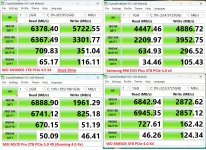
Here is the "stock" performance with the WD drive


Since there has been some confusion as to whether Lunar Lake supports Gen 5 SSD's (running them at Gen 5)
I decided to put in a MSI M570 Pro Frzr SSD (Yeah the one with the huge tower cooler)
Was pleasantly surprised I was able to mount the drive in the laptop with a thermal pad underneath and a copper heatsink on top with plenty of clearance to spare.

To be clear the drive does not throttle at all, it hits a maximum temp of 60C when its continually stressed (the side the ssd is mounted on is transferring heat to the actual laptop case) which is noticeable but not a problem.
After swapping in the M570 Drive, I discovered the NVME slot is running Gen 4.0 4X (which is fine) and while i'm getting the read speeds I would expect, the write speeds are complete garbage.


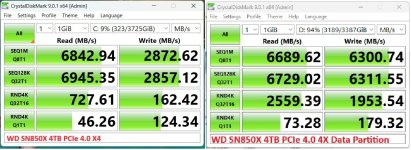
In fact the write speeds are so bad, my 4TB SN850X in a TB4 enclosure has better sequential write speeds....

I've checked in device manager that write caching is enabled, my next step is to see if there is a firmware update for the SSD, and see if there is a chipset drive that may be newer than what I'm using.
Anyone else have some ideas. I've used this M570 Drive in my Stealth 15 Laptop at Gen 4 speeds, and other systems at Gen 4 speeds without issues.
Picked up an Aspire 14 From Costco.
226V
16GB LPDDR5 8533
1TB WD SN5000S QLC SSD
Here is the "stock" performance with the WD drive
Since there has been some confusion as to whether Lunar Lake supports Gen 5 SSD's (running them at Gen 5)
I decided to put in a MSI M570 Pro Frzr SSD (Yeah the one with the huge tower cooler)
Was pleasantly surprised I was able to mount the drive in the laptop with a thermal pad underneath and a copper heatsink on top with plenty of clearance to spare.
To be clear the drive does not throttle at all, it hits a maximum temp of 60C when its continually stressed (the side the ssd is mounted on is transferring heat to the actual laptop case) which is noticeable but not a problem.
After swapping in the M570 Drive, I discovered the NVME slot is running Gen 4.0 4X (which is fine) and while i'm getting the read speeds I would expect, the write speeds are complete garbage.
In fact the write speeds are so bad, my 4TB SN850X in a TB4 enclosure has better sequential write speeds....
I've checked in device manager that write caching is enabled, my next step is to see if there is a firmware update for the SSD, and see if there is a chipset drive that may be newer than what I'm using.
Anyone else have some ideas. I've used this M570 Drive in my Stealth 15 Laptop at Gen 4 speeds, and other systems at Gen 4 speeds without issues.