DLSS 5 Autopilot Allows Users to Configure NVIDIA’s Neural Rendering Solution and Lower Performance Hits and Power Draw

Peter_Brosdahl

Moderator
Staff member
Joined
May 28, 2019
Messages
11,086
Reaction score
7,839
DLSS 5 Autopilot is a new app that allows users a huge amount of control in implementing NVIDIA’s neural rendering solution into games capable of supporting it. Available on GitHub, the app makes it relatively easy for users to install, configure, and use DLSS 5 in games. It can scan your library for compatible apps […]

See full article...
 
I'll post more about my experiences with this later but I spent a good chunk of this weekend using it and wow, very impressed. There's a learning curve but not much more than using NV CP, MSI AB, or similar apps.
 
Yep but took some dialing in. I've already been using MSI AB, and the NVIDIA app (in case AB gets ignored) to limit power to 70% but I've got a custom power curve in AB to undervolt as well. Using optiscaler I limited FPS to 70, sometimes 75, since I mostly play RPGs and are more interested in IQ than frames. I also, depending on the game used MFG x3 with a DLSS override to use the NVGX render, just to ensure the most recent dll was being used in case a game had an older one. Then I normally had the DLSS 5 slider set to between 70 - 100% depending on the game. DLSS was set to between Performance (transformer v2) and Quality (transformer v1)

All of this resulted in keeping my 5090s (one w/ 5800X3D and other 9800X3D) at between 250W - 400W! Mileage can vary greatly with the game, and I don't have screenshots since I was testing about a dozen games but I was most impressed with Blood of Dawnwalker but had to disable MFG due to horrible flickering. However, with DLSS 5 at 70%, and the above settings, it looked fantastic and hung between 60-75 FPS using DLSS quality.

When possible it will opt for OptiScaler, which up until now I knew about but hadn't used, and now I'm a huge fan of. Older games will need other paths and I had mixed experiences with those and need to do more testing with. Powerdraw for them is often minimal compared to newer titles.

For those used to digging into toggling PC/GPU settings, this is a godsend but it can be a siginifacnt learning curve for those who are not. Best part, if you really don't like it, only one click to restore/remove but I can't emphasize enough, given the risks of power hungry 5090s, is to tame it before trying. The power draw I got it down to matches what I'd been seeing before trying this but with the added IQ, so I'm very happy. I also updated to the latest NV driver from last week and it seemed to be bug free but I also always recommend doing a restart since they can break the hooks for AB, even if you restart the app. I saw some strange behavior during testing when I didn't and stuck to this approach once I moved on to installing on my 9800X3D rig.

Last note, moving the slider to 70% often allowed higher FPS, upwards and over 115 FPS, but limiting frames to 70-75 really was the icing on the cake for perf/power draw. At 115 FPS power usually hung 350-400 due to the limits via AB. All this, using max/ultra settings including RT at 4K.
 
One other detail regarding Optiscaler is the option to pick which DLSS 5 profile it uses, I chose cinematic given that's what's been getting the most coverage with all the game hacks since it was leaked. I tried the other two and like it the most but my testing was limited to having to do this on two different rigs, a dozen games, and still wanting to get some time digging into playing Dawnwalker.
 
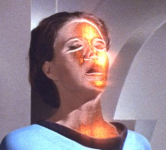
One thing I don't like with DLSS 5 so far, and perhaps NV will fix down the road, is that since it's being applied live I have noticed some distortion on some character faces when looking at them closeup. Now depending on your display this might not be noticeable but I was testing with an LG 42" C2 and LG 65" C9 and the best way I can describe it is like when that character on ST Lights of Zetar with the woman who was being possessed. It's not nearly extreme looking but depending on settings could be more pronounced and totally reminded me of those scenes. The still screenshots are not really able to capture this but watching live, say during a conversation with an NPC, I could definitely perceive some semi-transparent distortion.
 
best way I can describe it is like when that character on ST Lights of Zetar with the woman who was being possessed.
Ok so I had no idea what that was, but googled "ST Lights of Zetar with the woman who was being possessed" and amazingly:

1789407288237.png

Courtesy Trekkie Feminist
 
Yep, that's one. Those scenes totally freaked me out as a kid, mainly because of the audio when it was happening.
 
One thing I don't like with DLSS 5 so far, and perhaps NV will fix down the road, is that since it's being applied live I have noticed some distortion on some character faces when looking at them closeup. Now depending on your display this might not be noticeable but I was testing with an LG 42" C2 and LG 65" C9 and the best way I can describe it is like when that character on ST Lights of Zetar with the woman who was being possessed. It's not nearly extreme looking but depending on settings could be more pronounced and totally reminded me of those scenes. The still screenshots are not really able to capture this but watching live, say during a conversation with an NPC, I could definitely perceive some semi-transparent distortion.
Could add a nice creepy effect layer though! ;)
 
Become a Patron!
Back
Top