thank you so much skillz , glad to be hereWelcome to the team.

You are using an out of date browser. It may not display this or other websites correctly.
You should upgrade or use an alternative browser.
You should upgrade or use an alternative browser.
Folding@Home January TeAm record run 2026
- Thread starter StefanR5R
- Start date
I (alias xii5ku) am running three RTX 4090 right now (board power capped at 360 W, although actual power consumption rarely goes near that when running Folding@Home) and one Xeon E5-2699 v4.what all hardware are you guys using to run folding home
The latter warrants some explanation: Folding on CPUs gets one much lower points-per-day and much lower points-per-Joule than folding on GPUs. (Decent discrete GPUs, that is, not iGPUs which I guess are hardly better than CPUs.) And worse than CPUs are *old* CPUs like this Xeon. I am using it anyway due to three circumstances:
– I can tolerate its heat output currently.
– A while ago, my previous "daily driver" computer died and this Xeon based computer was the next best thing which I had on hand as a quick replacement.
– Last time I read about this subject, the Folding@Home consortium conducts projects on CPUs which do not overlap with their projects on GPUs. That is, volunteers' CPUs are giving them results which stand on their own. Even if poorly credited.
– A while ago, my previous "daily driver" computer died and this Xeon based computer was the next best thing which I had on hand as a quick replacement.
– Last time I read about this subject, the Folding@Home consortium conducts projects on CPUs which do not overlap with their projects on GPUs. That is, volunteers' CPUs are giving them results which stand on their own. Even if poorly credited.
Me, basically only during January. Throughout all year I am running BOINC based projects though. I have an unreliable Internet connection at home, and most of the BOINC based projects enable me to buffer work for arbitrary lengths of time, in contrast to Folding@Home which supports only very minimal buffering. I hate it if an unsupervised always-on computer goes idle due to empty work buffer. Furthermore, I lean a little more towards supporting physics/ geoscience/ astro projects, relative to bio/ medical projects.how often do you run it in routine daily life
Also, a while ago I experienced a degradation of my Internet connection which caused result file uploads to stall or ultimately fail quite often. This was a particular problem with all projects which (a) have large result files and (b) have an ocean located between me and the upload server. Both is true with Folding@Home. I have since found out how to fix this problem, by means of better IP packet queuing control locally on my computers, and can therefore participate at upload-heavy projects again, to the modest extent of the bandwidth of my Internet link. Right now I have Internet over TV cable, but soon™ I shall get FTTH with hopefully better stability and better upload bandwidth (depending on where the service provider's price gouging on the one hand and my stinginess on the other hand are going to meet). Ducts for FTTH have been buried in the street recently, but fiber has yet to be threaded in the street and installed in the house.
Apropos. My real points-per-day (PPD) are quite a bit lower than the estimated PPD which FAHControl is showing to me. I am guessing the main reason for this is that FAHControl does not take the time in account which it takes me to upload result files. But workunit turnaround times include the time needed for file transfers besides the actual computation time. Therefore slow transfers cut into the quick return credit bonus which F@H assigns to results.
Last edited:

- Joined
- Jan 1, 2026
- Messages
- 11
- Reaction score
- 20
i have a genuine curious question , what all hardware are you guys using to run folding home and how often do you run it in routine daily life
I think you will find everyone has a different story. Some of us have gotten very competitive and have over the years collected a unusual assortment of equipment. You can see a couple shown in another thread on this forum.
https://forums.thefpsreview.com/threads/dc-hardware-pictures-thread.18961/
I’m mostly at one end of the spectrum since I am GPU heavy, which limits me on the CPU projects.
I don’t use my main computer, an Apple Mac Mini, to crunch. My other rigs are mostly naked (without cases) and run the linux os.
Last edited:

- Joined
- Jun 4, 2019
- Messages
- 1,869
- Reaction score
- 1,770
i have a genuine curious question , what all hardware are you guys using to run folding home and how often do you run it in routine daily life
Well I'm currently not running F@H. Haven't decided if I'm going to this month or not.
I do run BOINC nearly 24/7 year around with a slow down during the hot months.
Hardware is mostly EPYC setups with a bunch of 30-series GPUs. Still got a bunch of Nvidia P100s, but I uninstalled them a while back. Got tired of the noise and the main project they were really good at (Milkyway@home) no longer has GPU work for them to do. They're decent at other projects, but not really worth it. Been debating just selling them for cheap to whoever wants to play with them.
I also have a bunch of servers and in datacenters, but none of them run BOINC. They just run various services and what not.
that is really informative and hey 3 4090's are insane lmaoI (alias xii5ku) am running three RTX 4090 right now (board power capped at 360 W, although actual power consumption rarely goes near that when running Folding@Home) and one Xeon E5-2699 v4.
The latter warrants some explanation: Folding on CPUs gets one much lower points-per-day and much lower points-per-Joule than folding on GPUs. (Decent discrete GPUs, that is, not iGPUs which I guess are hardly better than CPUs.) And worse than CPUs are *old* CPUs like this Xeon. I am using it anyway due to three circumstances:
– I can tolerate its heat output currently.– A while ago, my previous "daily driver" computer died and this Xeon based computer was the next best thing which I had on hand as a quick replacement.– Last time I read about this subject, the Folding@Home consortium conducts projects on CPUs which do not overlap with their projects on GPUs. That is, volunteers' CPUs are giving them results which stand on their own. Even if poorly credited.
Me, basically only during January. Throughout all year I am running BOINC based projects though. I have an unreliable Internet connection at home, and most of the BOINC based projects enable me to buffer work for arbitrary lengths of time, in contrast to Folding@Home which supports only very minimal buffering. I hate it if an unsupervised always-on computer goes idle due to empty work buffer. Furthermore, I lean a little more towards supporting physics/ geoscience/ astro projects, relative to bio/ medical projects.
Also, a while ago I experienced a degradation of my Internet connection which caused result file uploads to stall or ultimately fail quite often. This was a particular problem with all projects which (a) have large result files and (b) have an ocean located between me and the upload server. Both is true with Folding@Home. I have since found out how to fix this problem, by means of better IP packet queuing control locally on my computers, and can therefore participate at upload-heavy projects again, to the modest extent of the bandwidth of my Internet link. Right now I have Internet over TV cable, but soon™ I shall get FTTH with hopefully better stability and better upload bandwidth (depending on where the service provider's price gouging on the one hand and my stinginess on the other hand are going to meet). Ducts for FTTH have been buried in the street recently, but fiber has yet to be threaded in the street and installed in the house.
Apropos. My real points-per-day (PPD) are quite a bit lower than the estimated PPD which FAHControl is showing to me. I am guessing the main reason for this is that FAHControl does not take the time in account which it takes me to upload result files. But workunit turnaround times include the time needed for file transfers besides the actual computation time. Therefore slow transfers cut into the quick return credit bonus which F@H assigns to results.
that is cool , never thought of naked old pc using them , i have only had a gaming laptop till now and finally got my first ever pc which is the one i use to run folding home , i just keep it running when i go to sleep and other time use itI think you will find everyone has a different story. Some of us have gotten very competitive and have over the years collected a unusual assortment of equipment. You can see a couple shown in another thread on this forum.
https://forums.thefpsreview.com/threads/dc-hardware-pictures-thread.18961/
I’m mostly at one end of the spectrum since I am GPU heavy, which limits me on the CPU projects.
I don’t use my main computer, an Apple Mac Mini, to crunch. My other rigs are mostly naked (without cases) and run the linux os.
that is cool , why boinc the rest of the time though , i am new to this , didnt really knew about boinc , also awesome piece of hardware thereWell I'm currently not running F@H. Haven't decided if I'm going to this month or not.
I do run BOINC nearly 24/7 year around with a slow down during the hot months.
Hardware is mostly EPYC setups with a bunch of 30-series GPUs. Still got a bunch of Nvidia P100s, but I uninstalled them a while back. Got tired of the noise and the main project they were really good at (Milkyway@home) no longer has GPU work for them to do. They're decent at other projects, but not really worth it. Been debating just selling them for cheap to whoever wants to play with them.
I also have a bunch of servers and in datacenters, but none of them run BOINC. They just run various services and what not.
- Joined
- Jun 4, 2019
- Messages
- 1,869
- Reaction score
- 1,770
that is cool , why boinc the rest of the time though , i am new to this , didnt really knew about boinc , also awesome piece of hardware there
I find BOINC more fun. We have multiple competitions during the year that we compete in.
From the Primegrid Challenge Series which one is set to start in a few hours. A competition the team has dominated in the past few years winning something around 30 challenges consecutively and counting.
BOINCGames is another one we compete in and also it tracks individual stats similar to the Primegrid Challenges. One of our teammates @crashtech won the individual game last year which helped propel the team to a first place victory as well.
And the most prestigious competition of them all, the BOINC Pentathlon. Another competition that we have dominated in the last few years winning 4 in a row.
oh wow cool , how can i participate in those and join the teamI find BOINC more fun. We have multiple competitions during the year that we compete in.
From the Primegrid Challenge Series which one is set to start in a few hours. A competition the team has dominated in the past few years winning something around 30 challenges consecutively and counting.
BOINCGames is another one we compete in and also it tracks individual stats similar to the Primegrid Challenges. One of our teammates @crashtech won the individual game last year which helped propel the team to a first place victory as well.
And the most prestigious competition of them all, the BOINC Pentathlon. Another competition that we have dominated in the last few years winning 4 in a row.

- Joined
- Aug 31, 2025
- Messages
- 17
- Reaction score
- 16
Hello @kai001 and welcome!
Just like Folding@Home, BOINC (Berkely ((University)) Open Infrastructure for Network Computing) is piece of software you will need to download. When it first runs, you will be presented with a choice of what project you want to run.
1.) Select project and enter a user name and password
2.) Go the the project home page and sign in
3.) Look for your settings, often this will be in the upper right hand corner, it is your USERNAME, next to log out
4.) Click your username and on the right panel you should see some mention of Teams
5.) From teams search for TeAm AnandTech, select it, and join it
6.) BE VERY CAREFUL. It can be addicting.
 boinc.berkeley.edu
As far as hardware, I think a lot of us have far more than we can afford to run 24/7, except for those competitions, lol. As to those competitions, I think there is a thread here listing that.
My stuff (lots of long decommissioned rigs, and also many show up twice or more due to being dual boot, or reinstalling the OS a time or ten.
Just like Folding@Home, BOINC (Berkely ((University)) Open Infrastructure for Network Computing) is piece of software you will need to download. When it first runs, you will be presented with a choice of what project you want to run.
1.) Select project and enter a user name and password
2.) Go the the project home page and sign in
3.) Look for your settings, often this will be in the upper right hand corner, it is your USERNAME, next to log out
4.) Click your username and on the right panel you should see some mention of Teams
5.) From teams search for TeAm AnandTech, select it, and join it
6.) BE VERY CAREFUL. It can be addicting.
BOINC
BOINC is an open-source software platform for computing using volunteered resources
boinc.berkeley.edu
As far as hardware, I think a lot of us have far more than we can afford to run 24/7, except for those competitions, lol. As to those competitions, I think there is a thread here listing that.
My stuff (lots of long decommissioned rigs, and also many show up twice or more due to being dual boot, or reinstalling the OS a time or ten.
Last edited:
BOINC and Folding@Home work very much by the same principle:didnt really knew about boinc
- Volunteer installs a client software on his PC.
- Client contacts a project server and gets work assigned.
- Work server sends science application to client. (The exe is sent just once, or whenever an updated exe was made. Input data are typically sent for each workunit.)
- Client executes the work. Doing so it uses as many CPU cores and maybe GPU(s) as configured in the client. The user can restrict this as desired. (GPUs are of course only used by science applications which have GPGPU acceleration implemented.)
- Client uploads result files to a project server.
The Folding@Home client and server software is only used by Folding@Home. The BOINC client and server however are used by plenty of different projects. There have been (and still are) distributed computing projects which use something else.
Actually it's a dual-socket Xeon E5, and currently I run the Folding@Home client on one socket and the BOINC client on the other socket with an astronomy project. (Either workload could be spread across both sockets too, but this avoids cross-socket data traffic.)I am running three RTX 4090 right now [...] and one Xeon E5-2699 v4.
Welcome to the team @kai001 ! It seems like everybody else has done a great job of explaining BOINC and everything with that. I have a pretty wide variety of hardware both newer and older, but like 10esseeTony alluded to I don't run most of it 24/7 because it would use too much electricity. I'm running Folding@home currently on 2 4070 Supers, a 4070ti Super, a 5060ti, and 2 5070's (and occasionally a 3080 when the room it's located in needs some heat lol). Like Skillz I mostly run BOINC through the year, but in January I try to run some Folding@home. I have a pretty wide variety of CPU's I use for BOINC challenges, both desktop cpu's (mostly AMD - 3900x, 5950x, 7900x, 9950x, etc.) and also server CPU's (Older Broadwell Xeons, Cascade Lake Xeons, an Ice Lake Xeon, Sapphire Rapids Xeons, Emerald Rapids Xeons, EPYC Genoas, etc.). Let us know if you have any questions or need any assistance getting setup, everybody on our team is always happy to help out in any way.
thank you so much for the information , you guys seem to have some serious hardware for this lmao , i just used to run folding home on my 3070 ti laptop back a year ago but it didnt got logged since i switched account and i only about started a week ago since i got my proper first pc with a 5090 astral , but this and the laptop are the only two machines i have to run itHello @kai001 and welcome!
Just like Folding@Home, BOINC (Berkely ((University)) Open Infrastructure for Network Computing) is piece of software you will need to download. When it first runs, you will be presented with a choice of what project you want to run.
1.) Select project and enter a user name and password
2.) Go the the project home page and sign in
3.) Look for your settings, often this will be in the upper right hand corner, it is your USERNAME, next to log out
4.) Click your username and on the right panel you should see some mention of Teams
5.) From teams search for TeAm AnandTech, select it, and join it
6.) BE VERY CAREFUL. It can be addicting.
BOINC
BOINC is an open-source software platform for computing using volunteered resources
As far as hardware, I think a lot of us have far more than we can afford to run 24/7, except for those competitions, lol. As to those competitions, I think there is a thread here listing that.
My stuff (lots of long decommissioned rigs, and also many show up twice or more due to being dual boot, or reinstalling the OS a time or ten.
i see , dont you ever need these rigs and so much compute power for ur own stuff , having 3 4090 and letting them run this sounds cool and amazing lmao , what about your own personal compute , would love to know about itBOINC and Folding@Home work very much by the same principle:
Around this all there is typically a community of project scientists and admins and the volunteers. Usually such projects have message boards for project news, troubleshooting etc.. Some projects are very big (Folding@Home is certainly the biggest of them all), others very small (could be just one person running a project as a hobby, and having a few handful of volunteers donating computer time).
- Volunteer installs a client software on his PC.
- Client contacts a project server and gets work assigned.
- Work server sends science application to client. (The exe is sent just once, or whenever an updated exe was made. Input data are typically sent for each workunit.)
- Client executes the work. Doing so it uses as many CPU cores and maybe GPU(s) as configured in the client. The user can restrict this as desired. (GPUs are of course only used by science applications which have GPGPU acceleration implemented.)
- Client uploads result files to a project server.
The Folding@Home client and server software is only used by Folding@Home. The BOINC client and server however are used by plenty of different projects. There have been (and still are) distributed computing projects which use something else.
Actually it's a dual-socket Xeon E5, and currently I run the Folding@Home client on one socket and the BOINC client on the other socket with an astronomy project. (Either workload could be spread across both sockets too, but this avoids cross-socket data traffic.)
that sounds like a absurd huge amount of list of gpus and cpus lmao , i wonder how come u even got your hands on that big list of cpus , sounds amazing , and thank you for the warm welcome.Welcome to the team @kai001 ! It seems like everybody else has done a great job of explaining BOINC and everything with that. I have a pretty wide variety of hardware both newer and older, but like 10esseeTony alluded to I don't run most of it 24/7 because it would use too much electricity. I'm running Folding@home currently on 2 4070 Supers, a 4070ti Super, a 5060ti, and 2 5070's (and occasionally a 3080 when the room it's located in needs some heat lol). Like Skillz I mostly run BOINC through the year, but in January I try to run some Folding@home. I have a pretty wide variety of CPU's I use for BOINC challenges, both desktop cpu's (mostly AMD - 3900x, 5950x, 7900x, 9950x, etc.) and also server CPU's (Older Broadwell Xeons, Cascade Lake Xeons, an Ice Lake Xeon, Sapphire Rapids Xeons, Emerald Rapids Xeons, EPYC Genoas, etc.). Let us know if you have any questions or need any assistance getting setup, everybody on our team is always happy to help out in any way.
- Joined
- Jun 4, 2019
- Messages
- 1,869
- Reaction score
- 1,770
oh wow cool , how can i participate in those and join the team
I started a thread showing how to join the Primegrid Challenge series.

A few of us on the team buy hardware specifically for BOINC/Distributed Computing and have decent sized farms that can do a tremendous amount of computing.
Most of the hardware comes from eBay. Buying decommissioned enterprise hardware for relatively cheap.
Not sure if you're wanting to get into BOINC now or wait till later, but if you do so now then may I suggest running Primegrid during the challenge series?
You'd need to download BOINC, but I recommend downloading the 8.0.4 version and not the 8.2.x version as it has issues...
Most of the hardware comes from eBay. Buying decommissioned enterprise hardware for relatively cheap.
Not sure if you're wanting to get into BOINC now or wait till later, but if you do so now then may I suggest running Primegrid during the challenge series?
You'd need to download BOINC, but I recommend downloading the 8.0.4 version and not the 8.2.x version as it has issues...
- Skillz
- Replies: 6
- Forum: Distributed Computing

So we don't clutter this F@H thread with BOINC talk. Sorry about that.
day __ team total __ active members __ team rank for daily output
15 ____1,006,238,777 ________ 40 _________ 7
16 _____ 887,997,835 ________ 40 _________ 8
17 _____ 878,732,950 ________ 39 _________ 8
Looks good! Keep it going guys and gals. I know that several of us are now running PrimeGrid on CPUs due to the current challenge. So, while GPUs technically can stay at Folding@Home in parallel, a few of us might run into limits of electrical power or cooling capacity.
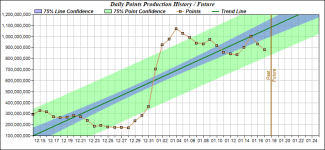
Total race points so far:
Folding@Home overall position - 14
TeAm total for 1/1 - 1/18 (12am CST) - 15,695,270,611
TeAm rank for 1/1 - 1/18 production - 8
______ points 1/1 - 1/18 ___ user name
1_______2,368,635,597_____Pokey_TA
2_______1,863,222,349_____IEC
3_______1,368,581,612_____Mark_F_Williams
4_______1,315,504,867_____crashtech
5_______1,267,602,329_____xii5ku
6_______1,178,641,796_____Icecold
7_______996,151,355_______biodoc
8_______872,871,859_______mmonnin
9_______665,591,080_______Oneto
10______660,406,376_______ChelseaOilman_GRC_7aac529d73a2ad65d9dd1b893fccf532
11______489,157,458_______10esseetony
12______407,186,543_______cellarnoise2
13______264,535,682_______Endgame124
14______264,399,219_______mazzmond
15______258,542,648_______DrNickRiviera
16______193,472,626_______fhonyotski
17______171,705,744_______underwriter
18______146,856,385_______Cliff_Taylor
19______112,793,680_______Mihryazd
20______104,390,955_______Hostile
21______103,769,213_______TiO2
22______85,027,545___Dexter
23______71,364,932___Ron_Michener
24______69,780,160___JohnnyWong1213
25______64,160,247___[TA]Assimilator1
26______55,541,018___Daniel_Trudeau
27______55,339,644___Lord-Vale3
28______32,748,900___kai'sa001
29______26,439,826___RK
30______22,684,872___LOL_Wut_Axel
31______20,641,672___creed3020
32______19,320,584___DainBramaged
33______18,647,460___Paul_McAvinney
34______15,599,921___mondrasek
35______12,035,237___TurtleBlue10475
36______11,706,773___Mickulty
37______7,903,606____Brazos
38______7,884,200____salvorhardin
39______5,173,097____Michael_Chin
40______3,861,796____davidm103
41______2,694,339____sduguid
42______2,167,243____slowbones
43______1,963,557____Hippo Droid
44______1,227,061____Familyman_19
45______1,095,989____Karetaker
46______1,090,959____Balzams
47______898,947______TA_JC
48______681,589______2StepBlack
49______661,279______Viperoni
50______656,482______shabs42
51______606,540______Saftfert
52______526,961______Spungo
53______423,222______J7_DirtyMan
54______363,076______saah
55______238,171______Athlex
56______53,000_______Shadow_Grimsby
57______24,766_______Ricky67*
58______8,368________QuietDad
59______5,466________Gp03
60______2,733________jlinfitt
New active member since my previous post: QuietDad
15 ____1,006,238,777 ________ 40 _________ 7
16 _____ 887,997,835 ________ 40 _________ 8
17 _____ 878,732,950 ________ 39 _________ 8
Looks good! Keep it going guys and gals. I know that several of us are now running PrimeGrid on CPUs due to the current challenge. So, while GPUs technically can stay at Folding@Home in parallel, a few of us might run into limits of electrical power or cooling capacity.
Total race points so far:
Folding@Home overall position - 14
TeAm total for 1/1 - 1/18 (12am CST) - 15,695,270,611
TeAm rank for 1/1 - 1/18 production - 8
______ points 1/1 - 1/18 ___ user name
1_______2,368,635,597_____Pokey_TA
2_______1,863,222,349_____IEC
3_______1,368,581,612_____Mark_F_Williams
4_______1,315,504,867_____crashtech
5_______1,267,602,329_____xii5ku
6_______1,178,641,796_____Icecold
7_______996,151,355_______biodoc
8_______872,871,859_______mmonnin
9_______665,591,080_______Oneto
10______660,406,376_______ChelseaOilman_GRC_7aac529d73a2ad65d9dd1b893fccf532
11______489,157,458_______10esseetony
12______407,186,543_______cellarnoise2
13______264,535,682_______Endgame124
14______264,399,219_______mazzmond
15______258,542,648_______DrNickRiviera
16______193,472,626_______fhonyotski
17______171,705,744_______underwriter
18______146,856,385_______Cliff_Taylor
19______112,793,680_______Mihryazd
20______104,390,955_______Hostile
21______103,769,213_______TiO2
22______85,027,545___Dexter
23______71,364,932___Ron_Michener
24______69,780,160___JohnnyWong1213
25______64,160,247___[TA]Assimilator1
26______55,541,018___Daniel_Trudeau
27______55,339,644___Lord-Vale3
28______32,748,900___kai'sa001
29______26,439,826___RK
30______22,684,872___LOL_Wut_Axel
31______20,641,672___creed3020
32______19,320,584___DainBramaged
33______18,647,460___Paul_McAvinney
34______15,599,921___mondrasek
35______12,035,237___TurtleBlue10475
36______11,706,773___Mickulty
37______7,903,606____Brazos
38______7,884,200____salvorhardin
39______5,173,097____Michael_Chin
40______3,861,796____davidm103
41______2,694,339____sduguid
42______2,167,243____slowbones
43______1,963,557____Hippo Droid
44______1,227,061____Familyman_19
45______1,095,989____Karetaker
46______1,090,959____Balzams
47______898,947______TA_JC
48______681,589______2StepBlack
49______661,279______Viperoni
50______656,482______shabs42
51______606,540______Saftfert
52______526,961______Spungo
53______423,222______J7_DirtyMan
54______363,076______saah
55______238,171______Athlex
56______53,000_______Shadow_Grimsby
57______24,766_______Ricky67*
58______8,368________QuietDad
59______5,466________Gp03
60______2,733________jlinfitt
New active member since my previous post: QuietDad
Several years ago, my day job sometimes involved running fairly complex physics simulations. Quick-and-dirty proof-of-concept runs with coarse grids would run overnight, but runs at decent grid resolutions would take several days to several weeks. First I ran that stuff on an Ethernet cluster of office PCs, but then I built two dual-socket Xeon servers for this purpose. Then, in 2016, I read a call to arms for a Folding@Home battle between AnandTech and Tom's Hardware. I wondered whether my two 2P severs would be useful for protein folding simulations too, and yes they turned out to be pretty good at that. That's when I joined TeAm AnandTech.dont you ever need these rigs and so much compute power for ur own stuff
Since then, the focus of my job gradually shifted away from computing heavy stuff, and all of my own bigger computers have since been built solely for the distributed computing hobby.
edit: typo
Last edited:
that has to be one of the coolest how i got crazy hardware for folding home story i have ever heard lmao. one day i might also get properly into it and specifically start building rigs for it.Several years ago, my day job sometimes involved running fairly complex physics simulations. Quick-and-dirty proof-of-concept runs with coarse grids would run overnight, but runs at decent grid resolutions would take several days to several weeks. First I ran that stuff on an Ethernet cluster of office PCs, but then I built two dual-socket Xeon servers for this purpose. Then, in 2016, I read a call to arms for a Folding@Home battle between AnandTech and Tom's Hardware. I wondered whether my two 2P severs would be useful for protein folding simulations too, and yes they turned out to be pretty good at that. That's when I joined TeAm AnandTech.
Since then, the focus of my job gradually shifted away from computing heavy stuff, and all of my own bigger computers have since been built solely for the distributed computing hobby.
edit: typo