How to easily use SAS drives on a consumer mobo?

igor_kavinski

Sort-of-Regular
Joined
Aug 15, 2025
Messages
206
Reaction score
115
@Skillz

I'm hoping you know the answer to my burning question. I have the opportunity to get a bunch of cheap SAS SSDs but I have zero idea on how to get them working. Any good suggestions for the required (and affordable) HBA card and cables and how to power the drives since the SAS connector is the weird data+power fused kind?
 
I think their are two versions. One version has a separate power connector while a newer version the power and data is all one cable. Probably depends on the drives you are getting. I'm guessing they'll probably be older drives where you can just use breakout cables to power them. Most of these breakout cables use the SATA power connectors on your PSU for them.

I've never used SAS drives in a "desktop" environment so to speak. Basically, all the SAS drives I've used I've used them in a server chassis that had a backplane for power and data delivery.

What SSDs are you getting?
 
I've never used SAS drives in a "desktop" environment so to speak. Basically, all the SAS drives I've used I've used them in a server chassis that had a backplane for power and data delivery.

What SSDs are you getting?
Same ones that are used in a backplane. I'm starting to get annoyed at this word. Like what if you want to extract the data off of such a SAS drive without access to a backplane?

1764988932814.png

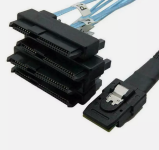
So I understand the wider connector goes into the drive's back. What's this smaller connector? How does it give power to the SAS drive in addition to data?
 
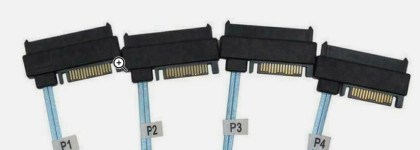
Look behind those 4 connectors. You'll see a SATA power connector on them.

1764990344439.png

The other connector is what goes into the HBA card you buy. (Or if your motherboard already has it built in some do.)
 
Last edited:
Become a Patron!
Back
Top