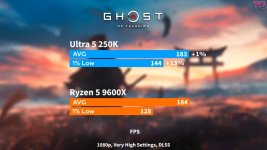
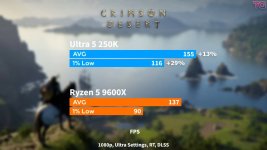
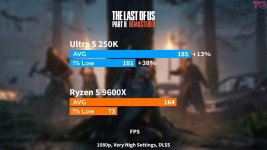
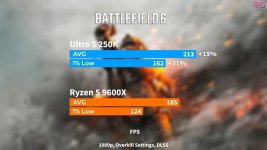
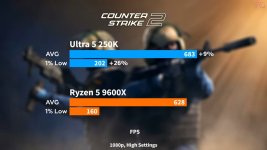
Leo Waldock: What is the connection between the January 2025 bug fix/rework and these 'Plus' processors? The audience will be seeing our reviews at the same time this call lifts, so is there any connection between those bug fixes from a year ago and these 'Plus' updates?
Robert Hallock: Absolutely. With those issues coming in January of 2025, we learned a lot about how users are getting software and updating their systems. We want to make sure customers are seeing the same performance we see in the lab. Through those missteps, the Intel Platform Performance Package was born. We are trying to simplify and streamline the process, making it much easier for users to get that final performance without having to go to ODM websites, our website, or the Microsoft Store. They can just download this package from our download center.
APO and Binary Optimization (2:31)
Leo: To clarify, this is a sort of unified driver and software package. I have two nodding heads, so I'm guessing that went well. At the moment, is that software a final version? I'm thinking about little tweaks like a green light to tell you how the thing is functioning.
Robert: Intel Application Optimization (APO) is still here; it matters at the operating system level, generally providing 5 to 10% performance in games that need support for thread priority or thread execution help. Binary Optimization is new in 'Plus' and will be on every desktop CPU going forward. This works at a different level from APO; we are actually optimizing the machine code of the .exe files and DLL files of certain games. When we see those function calls in our list, we substitute the slower machine code version for a more optimal, faster version on the fly. We have simply reordered how that file is laid out to better fit how our CPU digests machine code at the front end of the pipe.
Hardware Hooks and 'Plus' Changes (6:56)
Leo: You mentioned that 'Plus' sees gains that the existing Ultra 200S processors do not because the software has hooks into the 'Plus' hardware that don't exist in the older ones.
Robert: That's right. Binary Optimization is on 'Plus' because there are hardware hooks in the physical silicon that allow some of that functionality to occur. A refresh is a nice opportunity to bring in small changes that can open up a new path of optimization. It is difficult to bring Binary Optimization backward to older silicon because all the hardware hooks aren't there.
Process Node and Frequency (7:55)
Leo: So, we can describe the 'Plus' process node at TSMC on the CPU part hasn't changed. The architecture hasn't changed. These are tweaks that have enabled these updates to come to life.
Robert: It's a little bit of both. When you see a process technology, it's actually a family of technologies, and over time, the recipe to produce that technology gets better. In the industry, this is called a BKM (Best Known Method). These are small tweaks that can increase frequency and drive down power. Additionally, you can make small tweaks to the clock circuits in the architecture itself. These are not major architectural changes, but they are necessary to extract more frequency.
Gaming Performance vs. AMD (9:42)
Leo: Intel has successfully delivered mainstream processors and motherboards. However, AMD still has a significant edge in gaming, specifically with their 3D V-Cache processors. Is that a situation Intel has to accept for the rest of this year?
Robert: I think it's all about budgets. If you have $500, yes, the 9800X3D is about 10% faster than the 270K roughly at 1080p. Whether 10% is worth $200 extra is for users to decide based on their budget. We don't have the fastest gaming CPU right now, but we are extremely close for a pretty fair chunk less money that you could allocate to memory, a cooler, or a case.
CU-DIMM Memory (12:08)
Leo: When the Core Ultra 200S arrived, I received CU-DIMMs, and I had no idea what they were. Is this a legitimate mainstream technology, or is it going to be a niche product?
Robert: It's fuzzy. The official JEDEC spec says that if you are going to produce a DDR5 module at 6400 MTS or higher, it must be a CU-DIMM. It guarantees widespread compatibility. However, if you start adding more memory ranks and more density, it becomes extraordinarily difficult to host that capacity at speeds enthusiasts want. That is why quad-rank CU-DIMM is a very interesting technology. It's not a mainstream tech this year, but it is taking on as a technology, increasing in prominence over time because the CKD chips themselves are relatively inexpensive.
Elimination of Artificial Latency: By having more ranks, it eliminates performance penalties caused by memory being unable to read or write data because parts of it are on refresh, which the speaker refers to as "artificial latency" (27:44 - 28:04).*
Significant Gaming Benefits: The reduction in internal latency is statistically significant for PC games, particularly DirectX9 titles, console ports, and esports titles (28:04 - 28:29).