Mismatching RAM

Snowy

Slightly less n00b
Joined
Jul 6, 2019
Messages
125
Reaction score
78
Hi all,
I have 32GB of Crucial Ballistix DDR4-3600 PC4-28800 CL16 in my computer. Yesterday at Microcenter I picked up 32GB of Corsair Vengeance DDR4-3200 PC4-25600 CL16. Beside the speed difference, there should be no issue throwing this new memory into the computer w/ the Crucial for 64GB total? Will I need to adjust anything in the BIOS? I assume the computer will automatically switch the speed of the Crucial to match the speed of the Corsair but I am not certain.

Thanks
 
You're in for a fun time - start with memory at defaults (JEDEC, not XMP etc.), and move up from there, if the systems posts.
 
I used to have mismatched RAM all the time up to DDR3. Just manually set the timings of the slower RAM don't rely on automagical solutions. Still there are no guarantees that it will work.
 
Well I installed the RAM, set the speed to that of the slower sticks, then put everything else as "Auto" in the BIOS and it all seems to be working well thus far!
 
Well I installed the RAM, set the speed to that of the slower sticks, then put everything else as "Auto" in the BIOS and it all seems to be working well thus far!
Go run y-cruncher on it for a while - if it's stable stable, it'll pass (make sure your CPU is set to default too).
 
It errored out at 0.01% on my 12700K 7200 MT/s RAM profile, as it should because y-cruncher did the same. However, everything else (including Windows updates) seems to be fine.
Personally I'd dial it back - but stability is a spectrum, not a binary state, so if you can live with it then it's fine lol
 
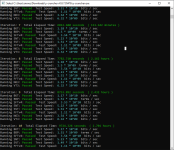
Well, I did 10 iterations of y-cruncher's stress test. Seems like it's okay. I've gotten a few crashes in Deadlock recently though, and am not sure if it's the memory of if I need to update my drivers.
1776305061129.png
 
Well, I did 10 iterations of y-cruncher's stress test. Seems like it's okay. I've gotten a few crashes in Deadlock recently though, and am not sure if it's the memory of if I need to update my drivers.
View attachment 4535
Nice I hope that works well for you!! I've ran mismatched ram before... it was fine... but every time I had a driver crash or other issue I looked at my ram and thought.... hummm... is that why? lol

Hence in the new rig I went with a pair of 32's for 64 matched. Serving me just fine.
 
Become a Patron!
Back
Top