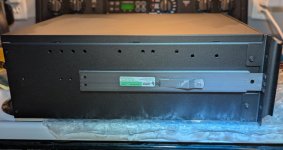
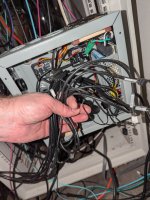
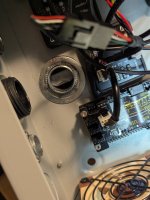
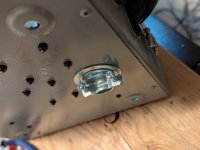
So, lets talk UPS upgrades.
Earlier in this thread I converted the old NEMA 14-30 dryer outlet in my "server room" to two NEMA 5-20 receptacles on an MWBC circuit. This gave me a lot more power to the server room, and let me plug each of my two APC SMT1500RM2U UPS:es into their own dedicated circuit.
But then I also added the Cyberpower PR1500LCD in there to run the workstation and game machine off of, it it became complicated.
Three 1500VA UPS:es (two SMT1500RM2U and one PR1500LCD) three outlets on different circuits (two dedicated 20amp in the MWBC, and one shared 15A that was the old washer outlet). There was no real ideal way to split the load, especially when I had to make decisions regarding which UPS to plug each device into to optimize uptime.
I started thinking - "wouldn't it be nice if I just had one large UPS and plugged everything into the same UPS, and didn't have to worry about load balancing everything? After all I have the ability to have 240v 30A here." With a 240v 30a circuit I have the ability to pull 7200va from one outlet. I'll never need that much power, but it would be nice to not have to worry about balancing loads across smaller circuits.
It wasn't an active search by any means, but I casually kept my eye on eBay just in case anything good popped up.
Two issues became apparent.
1.) High end enterprise UPS:es are expensive, even when you buy them used
2.) High end enterprise UPS:es are very heavy, and cost a lot to ship.
The large shipping companies (UPS and FedEx) apparently will not accept packages over 150lb (~70kg) so this means paying for freight, and freight is expensive, and gets even more expensive if you don't have a loading dock for easy unloading. (Believe it or not, my house does not have a loading dock)
But I kept an eye on things anyway. I was hopeful eventually something reasonably priced would pop up locally and I could drive over and pick it up myself.
At first I was looking for split phase systems that had both 120v and 240v outlets. These proved to be very rare, and when they did show up, quite expensive. Most US datacenters apparently use dedicated 208v/240v units, and if they wind up needing 120v use step-down transformers, which can be inefficient and are rather expensive in and of themselves
Maybe I should take a quick break here and explain how U.S. power delivery works.
Most consumer devices in the U.S. operate at 120v. (sometimes referred to as 110v on older devices) There is an acceptable range of voltages at the wall. I can't remember what they are, but in my house all the outlets are usually at 122-123v.
Typical residential power delivery in the U.S also supports 240v power. This is usually only used for large appliances (stoves/ovens/ranges/clothes dryers/heat pumps/AC units, etc.) The way this is accomplished is through
split phase power delivery.
There are two 120v AC live lines that enter the home. For most regular outlets you just use one or the other and wire them to neutral, trying to balance the load best you can between the two.
The two lines are polar opposites, meaning that while at any given time, the difference between either of them to neutral is 120v, but if you wire from one live line to the other live line you get 240v
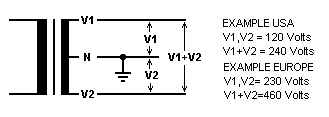
And that's how a 240v circuit is wired in residential/office power in the U.S.
Industrial power delivery can be a little bit different, and is often provided in 3-phase. If you take any two of the phases in 3-phase power delivery, and wire a circuit between them, you get 208v. So that's where the 208v comes from.
So, while most of our European friends have 230v live->neutral circuits, when we have power in the 200-240v range in the U.S. in residential it is usually 120v->120v split phase (no neutral) producing 240v or 208v with two out of 3 phases from a 3 phase system.
So, I was hoping to find a UPS that passes through both 120v and 240v, and that was just not happening.
I did an inventory of my rack - however - and found that absolutely everything in it is modern enough that it supports the full 100v-240v range of power inputs at 50-60hz
This means it can be plugged in pretty much anywhere in the world, and just work.
Japan is 100v 50hz
North America is largely 120v 60hz
Europe is 230v 50hz.
Some rare places actually have 110,115,127, 220 or 240v too.
These modern "world" AC adapters work everywhere.
So, it turns out, since everything in my rack supports 240v 60hz, I have no need for a unicorn 120v/240v system. I can just go all 240v.
So I continued casually browsing eBay, Facebook marketplace and Craigslist (which seems to have gone to ****, which is sad)
I kept finding units between $2000 and $5000 with shipping by freight that would cost me $300, just killing my budget. There were some really old units that were cheaper, but with those I was worried about aging capacitors and other problems, and I didn't want to risk it.
Then I found a 5000VA unit, new, listed at only $1,200.
It seemed suspiciously cheap, but I decided to click on it and do some further investigation.
Turns out it was a new old stock HPE R5000 (G1) manufactured in 2017 that had been sitting in a warehouse for 9 years and never sold.
These HPE R5000's were manufactured for HP by Eaton, and are generally regarded as tanks. They are Line Interactive models instead of Double Conversion models like all the newer ones out there, meaning that when power is good, they just pass through mains power, only switching to DC power when power at the wall is bad.
Newer Double Conversion models are generally considered to be better, as they constantly convert wall power to DC, and then DC power back to AC again, guaranteeing stable power and instant switchover to battery when needed. This first gen R5000 would have a few ms delay when switching to battery power, but generally this isn't a problem. Most consumer and smaller enterprise UPS units operate this way, and I have never seen anything that has had problems during the few ms delay switching from wall to battery power.
In fact, line interactive models are actually
better for me, because that means they capacitors are not always active, and thus the capacitors are much more likely to last a very long time.
So why had this unit been sitting in a box for 9 years unsold?
Well, it turns out the R5000 was a International High Power model designed to use Commando-style IEC60309 power connectors.
The 230v 32A single phase version of these:
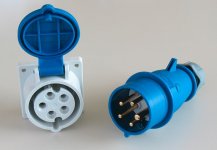
No one in the U.S. knows what to do with these power connectors. It probably scared potential buyers away.
I - of course - realized I could remove them, and install a 240v US L6-30 power connector. The International High Power unit was designed for 230v->neutral, but the UPS doesn't care if it is split circuit. It can only see the voltage between the two conductors, and 240v is 240v.... So it doesn't matter.
I wasn't sure the unit would be in working order after sitting for 9 years. I knew the batteries would be trash, as lead acid batteri4es need to be charged every 6 months or so or they degrade, so the original batteries were going to be complete garbage. They may have swollen or leaked. The capacitors may have seen thinning of the dielectric layer, and I didn't know if the unit was going to choke on 240v 60hz split phase instead of the 230v 50hz single phase it was intended for.
So it seemed like a risk. I made a $500 offer.
I didn't expect the seller to accept it. But they did. They just wanted the **** thing gone. It had been sitting in their warehouse since they bought it from an Amazon return pallet (presumably because someone accidentally bought the international version and returned it 9 years ago) and they probably figured they'd cut their losses and just stop the thing taking up space in their warehouse.
Now a different problem. I told them I'd pay cash, and come pick it up. They were in rural southern Delaware. I'm north of Boston. That's ~1,000 miles round trip. I guess it was time for a road trip.
So I made a spur of the moment road trip out of it. Made plans to see an old college friend who lives in Baltimore while I was down there. I figured at least if the UPS turned out to be a dud, the trip would not be
completely in vain.
I drove down, caught up with my friend in Baltimore, crashed at a hotel in rural southern Delaware, and then picked up the unit at this weird warehouse right in the middle of farm fields:
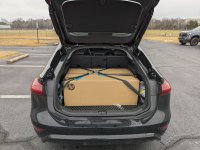
Then I hit the road back.
I found the box had been opened, but it was apparently unused. Film on displays was still there, as were the stickers covering the power attachments for the batteries.
And importantly, the massive rack mount kit and network management card were still in the box.
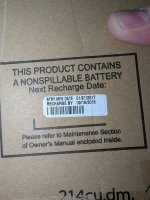
Yeah, these batteries were not going to be good anymore. Luckily they had not swelled, and were thus not stuck in the unit.
So, I got the unit home, and discovered that while it was really easy to load it into the car with two people, getting it back out alone was not going to happen. It was simply too heavy.
With great difficulty I was able to rotate it in the trunk and then cut open the side of thee box aligned with the front of the unit, and then slid the three battery modules (6 batteries each) out one by one.
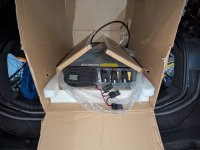
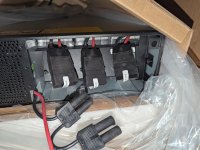
Unsurprisingly, Eaton/HPE used great Yuasa batteries from the factory.
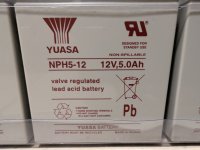
while they are great, the better the lead acid battery, the heavier it is.
With all of the batteries out, I was finally able to lift the unit out and bring it inside. where I started the process of replacing the connectors:
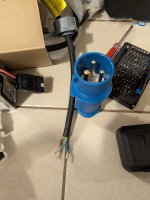
In the U.S. our color codes for residential AC power are usually as follows:
Black - Line 1 (120v)
Red - Line 2 (120v, opposite phase)
White - Neutral
Green or bare copper - Ground
In Europe the colors codes are slightly different:
Brown - Line 1 (230v)
Blue - Neutral
Green/yellow - Ground.
So I wired the brown to Line 1, the blue to line 2, and the ground to ground. No neutral needed for this one, as the circuit is between the two live wires.
I could have wired them to a NEMA 14-30 dryer plug (just not using the ground wire) but I wanted to do it right, and the right plugs for these units are L6-30 plugs. These are round locking 240v connectors (insert, then twist to lock) designed for two live wires and a ground.
These UPS units have one male plug (for plugging them into the wall) and one female pigtail for connecting a large PDU for multi-rack installs. I won't be needing the large PDU, but I decided to replace the female connector on the pigtail anyway for good measure.
There are many manufacturers for these replacement plugs, but Hubbell is widely regarded to be the best, so I went with them.
HBL2621 for the male and
HBL2623 for the female.
Then I also needed to replace the receptacle in the wall to match, and return the breaker to a 30 amp dipole breaker.
This provided to be a bigger challenge than I expected. NEMA 14-30 dryer plugs are pretty common. Most people have a dryer. They are large, bulky plugs and as such are typically installed centered in a two-gang electrical box. So, this is why there was a two gang box already in the wall (and why I could previously install two NEMA 5-20 receptacles in it, earlier in this thread.)
However, the round L6-30 receptacle is smaller, and is typically installed in a single gang box. I was thinking I could just reuse the blank cover from the NEMA 14-30, but no, the hole in it was WAY too big. I could find the smaller 1.62" hole faceplates locally, but only for single gang installations, but I wasn't about to just install it on one side, and ghetto mount a blank to the gaping hole on the other... (I'm not sure if this even meets code)
After much frustrating searching I finally found a faceplate from a company amusingly named "
Kyle Switch Plates". I would have preferred it in stainless, but that one was sold out, so unwilling to delay things any further I just ordered the white one.
It turns out the previous stainless faceplate was not kind to the wall, gouging it a bit, and this faceplate was smaller than that one, and thus not covering the damage, but at least it worked:
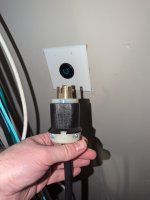
Now, I was concerned that the capacitors may have suffered from having thinned dielectric layers due to sitting unused for 9 years, so I decided to go gentle on it, plugging it in, and powering it on, but letting it sit without batteries or load for a few days.
This approach is called "reforming" as it can allow the capacitors to re-grow their dielectric layer.
If you just go full load right out of long term disuse, it is likely to let out the magic smoke.
So that's what I did.
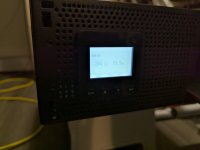
Plugged it in, and it immediately saw 244v. It (rather politely, not obnoxiously loud at all) beeped at me, until I went into the menu and changed the power settings from 230v 50hz to 240v 60hz.
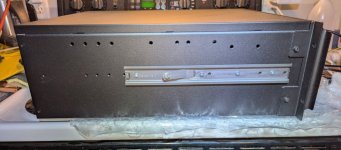
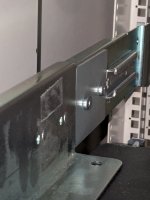
Then it was time to install the rail kit in the rack, which was a bloody nightmare.
HP/Eaton in their wisdom designed this rail kit to be installed by taking the side panels off the rack in order to screw in some of the brackets on the sides.
Mine CAN come off, but with great difficulty, and taking the right side off would entail removing the radiators again (which I was not about to do)
So, I did it from the inside, often with insufficient space, and blind. I dropped screws into irretrievable places and cursed a lot, but the one thing I do appreciate about HPE with this design is that they included plenty of spare screws, something most rail kits don't.
Then when I thought I had the **** thing fully installed, I discovered a problem. (And apparently I have to split the post here, due to a 10 image max per post limit)