The Z Build(s) 3.0 - Go Big and/or Go Home

I decided it was time to replace the temporary CPU cooler in the workstation with the water block. I started this on a Friday evening after work, knowing that at this point I have crossed the river.

Absolutely everything I do on this project takes longer than I expect, and I had to be up and running Monday morning for work.

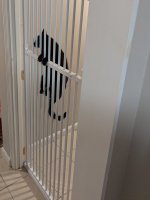
As usual, the cats aren't helping, constantly wanting to get into my little "workshop" with incessant crying for my attention. It is both cute and very distracting at the same time.

01.jpg

I swear they are just as socially dependent as dogs...

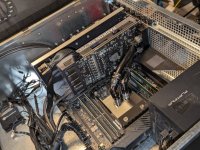
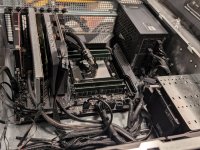
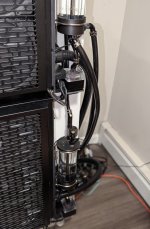
Anyway, I installed the block, and the PCIe slot passthroughs:

02.jpg

03.jpg


And then moved on to installing the rackmount rails, which was not straight forward at all.

I have installed many rackmount rails in my life, but these were confusing, and did not have any instructions.

Luckily some dude on youtube had my back:


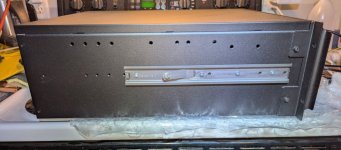
Inner rails go on the side of the case:

04.jpg

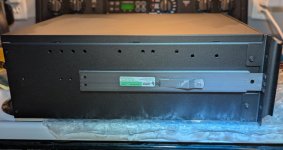
Mid and outer rails slide over them as follows (once installed in the rack):

05.jpg

Unfortunately I seem to have forgotten to take pics when installing the mid and outer rails into the rack. That took 12 arms and reaching in unforgiving ways, so taking pictures was the last thing on my mind.

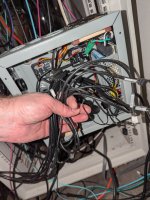
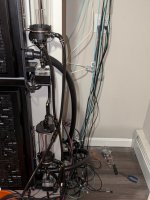
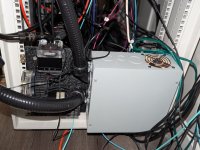
Moving on to installing the watertight conduit to try to tame the medusas hair of wires this project has resulted in.

Uh oh, many may have become too long. This box is going to be cramped...

06.jpg
 
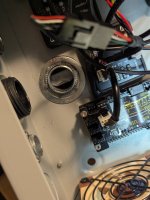
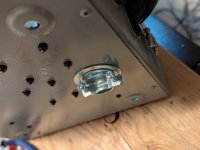
I decided to replace the rubber gasket in the hole in the back of the box with a clamping fitting to prevent accidental ripping out of wires and bending of pins. Since the hole was a little large, this resulted in needing a set of reducing washers:

07.jpg

08.jpg


Which brings us to another thing I forgot to take pictures of.

The watertight conduit coming off of the roll had a shocking amount of curved "memory". I needed to get rid of that memory to make this work.

I cut off some lengths I wanted to use, drilled some holes in the top and bottom of each for zip ties, and used them to hang the lengths of conduit from the ceiling, and hang a dumb bell from the bottom. Then I broke out the heat gun and gently warmed the lengths of conduit, slowly straightening them.

It was a pain in the butt, but it sort of worked.

After that it was time to install them. It's still pretty messy looking, but we are getting there:

09.jpg

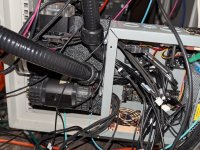
Well, this is going to be a cable management nightmare when I plug it all in.

10.jpg

And this is where I once again realized, that because I was rushing I forgot to take pictures of the hooking up of the last bit of tubing runing from the reservoir through a pair of Koolance QD3's to the DDC pump on the top of the bracket, out the back, through a second pair of Koolance QD3's to the case, and then back out, through a third pair of QD3's and back up to the reservoir.

I'll get better pictures of this once everything is done and cleaned up.

It was time to fill the system with the actual coolant this time.

It took almost exactly 8 liters of XSPC Pure clear coolant:

11.jpg

With the system full of coolant, it was now time to crawl in behind the rack, lay down on the floor and try to figure out some assemblance of wire management in the box, while getting everything plugged in where it goes in order to fire the system up and have it actually cool the workstation for the first time.

It was during this process that I realized that while the two DDC pumps attached to the radiators for the radiator portion of the loop were working fine, the DDC pump that was supposed to flow coolant to the workstation was dead as a doornail. It would not power up at all.

I guess it is time for troubleshooting again...

This is exactly what I didn't need to happen. It was Sunday evening. I needed my workstation Monday morning...
 
It was during this process that I realized that while the two DDC pumps attached to the radiators for the radiator portion of the loop were working fine, the DDC pump that was supposed to flow coolant to the workstation was dead as a doornail. It would not power up at all.

I guess it is time for troubleshooting again...

This is exactly what I didn't need to happen. It was Sunday evening. I needed my workstation Monday morning...


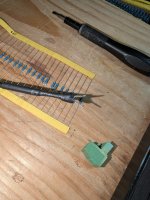
Alright, some troubleshooting later I found the problem.

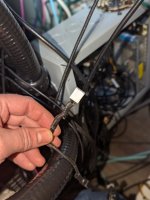
One of the crimps on my custom cabling was bad.

01.jpg

...so now I had to crawl on the floor and crimp laying on my side. Fun fun....

Now to get the external loop to trigger when the workstation powers on.

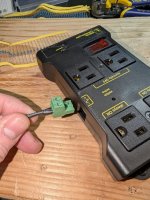
I have an opto-isolated relay triggered power strip I bought a while back for a different project that I wound up not needing, so I decided to use that.

Opto-isolated relays are really cool. They prevent accidentally sending 120VAC up the control signal where it shouldn't go by electrically isolating the two sides.

Inside of the hosuing there is a sealed relay unit. Inside of it the control signal lights up a little LED light. When the mains voltage AC side sees the light from that LED, it knows to turn on the power switch.

The opto-isolated relay did not have an integrated bleeder resistor to sink residual charge during shutoff, so I included one in my wiring.

02.jpg

The reason for this is that when the 12v DC power is switched off there is some residual in the circuit, and having a resistor in parallel helps drain this so that when you shut off, you don't have either a slow shutoff, or a shutoff that fluctuates on and off.

For 12v in this use case 4.7kOhm is the perfect size.

03.jpg

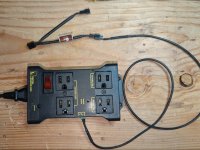
I chose to use the same fan cable that powers and controls the Workstation DDC pump with a splitter to trigger the relay.

04.jpg

So, now whenever the Workstation powers up, the pump gets power, and when the pump gets power, it triggers the relay, and the whole cooling system comes to life.


Right now it is only a single wire coming from the workstation:

12vdc + ground -> 4k7ohm resistor between 12vdc and ground -> relay

Pretty simple.

It gets ever so slightly more complicated when we add the second pc, but not much.

At that point the 12VDC line will look like this:

Code:
PC1 12VDC -> diode \
                     ---->   \    ----------------------->    Relay + terminal
PC2 12VDC -> diode /           \
                          4k7 ohm Resistor                 
PC1 Ground \                   /
            ------------->   /     ----------------------->   Relay - Terminal
PC2 Ground /

Please bear with me. I'm an engineer, but I am not an electrical engineer, and drawing circuits, especially in ASCII is not my expertise.

The diodes serve to make sure that power can only go in one direction, so when one power supply is accidentally slightly higher in voltage than the other, we don;t ahve power flowing the wrong way, causing problems.

Anyway. More on this later when we get to Phase 2.

At this point it was 4AM and I had work the next day. I was tired, and probably not very productive that day, but at least my workstation was up and running!

Next up we'll have to Phase 1 final pics, and some initial performance tests.

The performance tests will be of limited value, as in Phase 1 we are only cooling a single CPU, but to be fair, it is a pretty hot CPU, so it should tell us something.
 
Last edited:
Please bear with me. I'm an engineer, but I am not an electrical engineer, and drawing circuits, especially in ASCII is not my expertise.
Interesting. I've often seen arresting diodes on coils to prevent inductive kick, but first time I've seen a bleeder used like this external to equipment. I do like how you are using the diodes to make the 12V PSUs redundant parallel supplies.
 
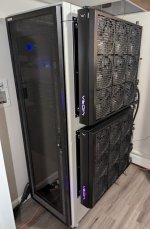
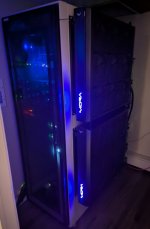
Alright, first off, here are some semi- finished (could still use some cleanup, especially the rack cable management which is a bit of a rats nest) Phase 1 pictures.

01.jpg


02.jpg


03.jpg

...yeah, this is obviously the back of the rack, not very visible, but it is a rats nest of fiber optic, Ethernet and power cables I really ought to do something about.

04.jpg

We're not done yet. Phase 2 (the game machine) is yet to come. But this is a major milestone, so I decided it deserved some pics
 
Alright. Some numbers.

First off, the flow through the radiators is actually a little bit better than my previous pessimistic figures. I think during the first fill I forgot that I had to tell the Aquaero which type of flow meter was connected for the calibration data.

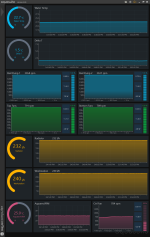
So I get 232 L/h through the radiators. This is a bit lower than I had predicted with the two DDC's (I had calculated 400 l/h) but it is ~1.02 GPM, so its not terrible.

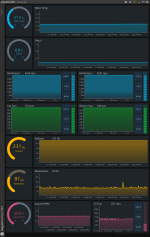
I spent some time putting together a dashboard in Aquasuite so I could get some cool charts and graphs.

All of the testing is done with just the single Threadripper 3960x in the loop. Now keep in mind that this is a quite substantial CPU. It idles using more power than most CPU's use at full load :p

Power output per the sensors in the package is about 80W at idle on the desktop, and about 287w at full load.

So for this test I manually cranked up the fans and the pumps *except the workstation loop pump, which is controlled by the motherboard) to max, and then decided to see where everything settled in,

First we have idle on the desktop:

0.8C Delta T.png

Delta T between the coolant and ambient is 0.8C at 80W. Not bad. 😅

I should note how I measure Delta T here. As you may recall there are three CaliTemp temperature sensors in the loop. One just below the reservoir for each pump intake. The theory here is that if a pump is starting to ingest warmer water, we want to make sure that doesn't happen.

I use the hottest of the three Calitemp sensors as being representative of the loop temperature. It is the worst case. They have thus far been within about half a degree of each other, but given our very low delta T that's actually quite significant 😅

There are two ambient temperature sensors. They are the traditional 10kΩ NTC Thermistors (with a beta of 3950) most PC thermal probe headers use. (you might have seen the wires for them dangling in the pictures in the previous post) They are good, but not quite as well calibrated as Aquacomputers Calitemp sensors, so to make sure I was comparing apples to apples, I let the system sit overnight, then powered on the loop without a PC load, and calibrated the ambient temperature sensors to the average of the three Calitemp sensors using a linear offset.

So, the measured Delta T is the hottest of the three Calitemp sensors in the loop minus the average of the two ambient sensors.

Anyway, time for the load test.

For this test I wanted to get the most heat out of the Threadripper to see how the loop would perform. I know I'd come nowhere near stressing it like the combination of the Ryzen 9 9950X3d and RTX 5090 will later, but I wanted to give it the most I could.

So I ran Prime95 (well, the linux version, mprime) with small FFT's.

A standard Prim95 run uses mixed large and small FFT's. The Large FFT's have a lot of RAM activity and stress the RAM, whereas the small FFT's sit mostly in the cache and really allow the CPU to be hammered and as hot as it is going to get. In my case, 287W, as the Threadripper is at its power limit. (which is technically supposed to be 280w, but I guess it can go slightly over)

1.5C Delta T.png

A 1.5C Delta T at full load. Not bad. 😅

As you can see, this time the workstation pump was up to full blast.

Incredibly, at this load, the hottest CCD only hit just under 60C (like 59.8C) which is unheard of for a Zen2 Threadripper. A Small FFT run on a Threadripper is usually going to thermal throttle with air or even AIO cooling. You are only ever going to see anything below max temps on a very beefy custom loop. I guess that is what I have built 😅


Alright, so the above looks pretty good, but lets keep in mind that I have only loaded it up with just north of 280W thus far.

The game machine 9950X3D can put out between 150W and 200W of heat, and the RTX5090 can get up to 600W, so even if the workstation is powered off, and nothing is going on in the background, this system needs to handle 750W-800W which is a much bigger challenge.

And if I have the workstation crunching something in the background, we are talking almost 1100w.

So, it is not over yet.

Which is why I am thinking about some performance enhancements. It may seem a bit silly, but my goal here is to keep the 5090 at 40C or under at full load in order to maximize boost clocks at all times. That's not going to be easy, and I need every little bit of cooling performance I can get.


Radiator pumps:

It looks like when I was ordering these pumps I inadvertently got the cost reduced 8W Chinese copy versions of the DDC, not the real deal at 15W - 18W. The Chinese brands (like Freezemod, Bykski, etc.) sell them side by side, and they are visually indistinguishable from each other.

I may wind up needing to upgrade these to actual Laing/Xylem PWM 4.2 DDC pumps. Time will tell.

Unfortunately since the pumps I bought are knockoff DDC's that use a cost reduced shaft design, I won't be able to use the same pump bodies or tops I currently have, which means there will need to be some modifications to the plastic brackets on the radiators. (ugh)

I'm not going to jump to conclusions though. I am going to wait until I can load it up with the actual game machine before I decide. THe metric here will be the temperature in each of the reservoirs. If both reservoirs are roughly even temperature wise, then the ~1GPM of flow will be enough, and I won't have to take any further action. If the reservoir that has the RTX5090 attached to it is much hotter than the reservoir that has the 9950X3d attached to it, then I know that the flow is insufficient to keep up with things.


Fans:

It turns out that in my research for this project, I totally miseed that Watercool has a special version of the Noctua NF-A20 they designed this radiator around. They call it the Noctua NF-A20 HS PWM. (The HS part - presumably high speed - being the key)

Standard Noctua NF-A20 fans range from ~350rpm (lowest PWM duty cycle) to ~800rpm (highest PWM duty cycle). The Watercool HS versions are essentially the same fan, but with a beefier motor that makes them spin between ~500rpm and ~1200rpm.

The latter are the fans I should have bought, but instead I installed all standard speed NF-A20's.

This is especially true since my radiators are "wall" mounted, and thus could definitely benefit from the much greater static pressure when forcing air through them.

The thing is, Noctua doesn't even acknowledge that these HS variant fans exist on their webpage.

It turns out these HS variants of the NF-A20 are not stocked anywhere I could find in the U.S.

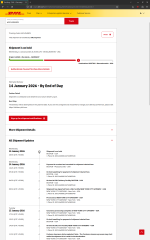
So I ordered some from Watercool in Germany. This time with tariffs 🙄

DHL Tariff Hold.png

I have the faster fans now, but I don't plan on installing them until after I get initial test temperatures with the game machine up and running, because I want to see the before and after temp difference.

Side note: Does anyone know anyone looking to buy 18 200mm Noctua fans? 😅
 
Interesting. I've often seen arresting diodes on coils to prevent inductive kick, but first time I've seen a bleeder used like this external to equipment. I do like how you are using the diodes to make the 12V PSUs redundant parallel supplies.
I figured it was absolutely necessary, because even really good PSU's are not perfect, +12VDC can range up and down by a few tenths of a volt, and if one PSU is skewing high, and one low, you could have some reverse power flow going on, and god knows what that might do to the PSU witht he lower 12v output and that entire system by extension.

Again, I am not an electrical engineer, but Iunderstand this is essentially what is called a "Discrete OR Gate" or a "Diode-OR Circuit" (or sometimes even a "Diode-OR Power Multiplexer).

To make things easier I bought myself one of these small boards with diodes and terminal blocks. I'm tired of soldering custom wires. 😅

51G8gXs3S3L._SL1010_.jpg


From my research on the topic, for my voltage (12v), low current and desired low leakage, is that 1N4007 diodes are the perfect choice here.
 
Apologies for the lack of updates.

I have run into an issue I am trying to resolve, and it has slowed down progress significantly.

I started to build the game system (build pics and progress coming soon) with a 9950x3d, and started dialing in RAM settings and things were generally pretty good.

Then the 9850x3d launched, and I was able to get my hands on one immediately. My thought process was I want this thing to be the most capable I can make it when it goes online.

But that's where the problems started.

I have a MSI MAG x870e Tomahawk and a 64GB dual rank DDR5-6000 CL26 kit.

With the 9950x3d this were great.

On the latest BIOS when I started (7E59v2A94, 2026-01-13) I was able to get it running rock stable at FCLK=2133Mhz, and UCLK=MCLK=3200Mhz, dropping the CAS latency to 28, and manually optimizing the subtimings.

Code:
AIDA64 Memory Benchmark:
Read: 86850 MB/s
Write: 92901 MB/s
Copy: 79846 MB/s
Latency: 65.9ns

These settings pass any memory stress test I can throw at them. OCCT, Prime95 large FFT's, you name it.

Pretty decent results for a dual chip CPU

But when I dropped in the 9850X3d, performance was terrible. Which is particularly annoying, as a single CCD chip should have better RAM performance due to less traversal of the fabric.

Code:
AIDA64 Memory Benchmark:
Read: 68147 MB/s
Write: 92354 MB/s
Copy: 63527 MB/s
Latency: 65.7ns

The RAM is still stable, passing all the same stability tests as above, but while it seems like writes are fine, reads are terrible for some reason, and the poor reads are likely killing the copy benchmark (which does both reading and writing)

But, this was with the 7E59v2A94 BIOS released before the 9850X3d. It lists the CPU as "unknown" so it isn't exactly surprising that it might not work right.

MSI has two newer BIOS revisions that do recognize and support the 9850X3d:
  • 7E59v2A95 (January 22nd)
  • 7E59v2AA0 (January 30th)

On these BIOS:es performance seems OK, but stability is very much not OK.

The system can't get through more than 1-5 minutes of OCCT memory stability testing before through hundreds if not thousands of errors, and eventually crashing. Even if I drop to default or EXPO settings.

So I have been in a bit of a holding pattern since January 31st when I received the 9850x3d just waiting for a working BIOS. 41 days and counting with nothing but crickets from MSI.

I've seen some other motherboard makers releasing beta BIOS:es with AGESA 1.3.0.0a. I have no idea if this resolves the issue, but I haven't been able to test it, as MSI hasnt released one yet. Only BIOS:es with pre-1.3.3.0 AGESA's.

I don’t know who dropped the ball with this launch, if it was AMD or MSI, but it is starting to get on my nerves.

Anyway, in the mean time I have shifted my attention to upgrading my UPS:es in my rack. I'll post more about that soon too.

Lets just say that @Brian_B may have predicted the future...

Kinda surprised you didn’t leave the 230 outlet at 230 and run the PSUs off the higher voltage for that smidge better efficiency
 
Last edited:
So, lets talk UPS upgrades.

Earlier in this thread I converted the old NEMA 14-30 dryer outlet in my "server room" to two NEMA 5-20 receptacles on an MBWC circuit. This gave me a lot more power to the server room, and let me plug each of my two APC SMT1500RM2U UPS:es into their own dedicated circuit.

But then I also added the Cyberpower PR1500LCD in there to run the workstation and game machine off of, it it became complicated.

Three 1500VA UPS:es (two SMT1500RM2U and one PR1500LCD) three outlets on different circuits (two dedicated 20amp in the MWBC, and one shared 15A that was the old washer outlet). There was no real ideal way to split the load, especially when I had to make decisions regarding which UPS to plug each device into to optimize uptime.

I started thinking - "wouldn't it be nice if I just had one large UPS and plugged everything into the same UPS, and didn't have to worry about load balancing everything? After all I have the ability to have 240v 30A here."

It wasn't an active search by any means, but I casually kept my eye on eBay just in case anything good popped up.

Two issues became apparent.

1.) High end enterprise UPS:es are expensive, even when you buy them used
2.) High end enterprise UPS:es are very heavy, and cost a lot to ship.

The large shipping companies (UPS and FedEx) apparently will not accept packages over 150lb (~70kg) so this means paying for freight, and freight is expensive, and gets even more expensive if you don't have a loading dock for easy unloading. (Believe it or not, my house does not have a loading dock)

But I kept an eye on things anyway. I was hopeful eventually something reasonably priced would pop up locally and I could drive over and pick it up myself.

At first I was looking for split phase systems that had both 120v and 240v outlets. These proved to be very rare, and when they did show up, quite expensive. Most US datacenters apparently use dedicated 208v/240v units, and if they wind up needing 120v use step-down transformers, which can be inefficient and are rather expensive in and of themselves

Maybe I should take a quick break here and explain how U.S. power delivery works.

Most consumer devices in the U.S. operate at 120v. (sometimes referred to as 110v on older devices) There is an acceptable range of voltages at the wall. I can't remember what they are, but in my house all the outlets are usually at 122-123v.

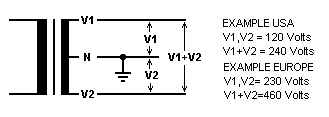
Typical residential power delivery in the U.S also supports 240v power. This is usually only used for large appliances (stoves/ovens/ranges/clothes dryers/heat pumps/AC units, etc.) The way this is accomplished is through split phase power delivery.

There are two 120v AC live lines that enter the home. For most regular outlets you just use one or the other and wire them to neutral, trying to balance the load best you can between the two.

The two lines are polar opposites, meaning that while at any given time, the difference between either of them to neutral is 120v, but if you wire from one live line to the other live line you get 240v
Split_phase2.png

And that's how a 240v circuit is wired in residential/office power in the U.S.

Industrial power delivery can be a little bit different, and is often provided in 3-phase. If you take any two of the phases in 3-phase power delivery, and wire a circuit between them, you get 208v. So that's where the 208v comes from.

So, while most of our European friends have 230v live->neutral circuits, when we have power in the 200-240v range in the U.S. in residential it is usually 120v->120v split phase (no neutral) producing 240v or 208v with two out of 3 phases from a 3 phase system.

So, I was hoping to find a UPS that passes through both 120v and 240v, and that was just not happening.

I did an inventory of my rack - however - and found that absolutely everything in it is modern enough that it supports the full 100v-240v range of power inputs at 50-60hz

This means it can be plugged in pretty much anywhere in the world, and just work.
Japan is 100v 50hz
North America is largely 120v 60hz
Europe is 230v 50hz.
Some rare places actually have 110,115,127, 220 or 240v too.

These modern "world" AC adapters work everywhere.

So, it turns out, since everything in my rack supports 240v 60hz, I have no need for a unicorn 120v/240v system. I can just go all 240v.

So I continued casually browsing eBay, Facebook marketplace and Craigslist (which seems to have gone to ****, which is sad)

I kept finding units between $2000 and $5000 with shipping by freight that would cost me $300, just killing my budget. There were some really old units that were cheaper, but with those I was worried about aging capacitors and other problems, and I didn't want to risk it.

Then I found a 5000VA unit, new, listed at only $1,200.

It seemed suspiciously cheap, but I decided to click on it and do some further investigation.

Turns out it was a new old stock HPE R5000 (G1) manufactured in 2017 that had been sitting in a warehouse for 9 years and never sold.

These HPE R5000's were manufactured for HP by Eaton, and are generally regarded as tanks. They are Line Interactive models instead of Double Conversion models like all the newer ones out there, meaning that when power is good, they just pass through mains power, only switching to DC power when power at the wall is bad.

Newer Double Conversion models are generally considered to be better, as they constantly convert wall power to DC, and then DC power back to AC again, guaranteeing stable power and instant switchover to battery when needed. This first gen R5000 would have a few ms delay when switching to battery power, but generally this isn't a problem. Most consumer and smaller enterprise UPS units operate this way, and I have never seen anything that has had problems during the few ms delay switching from wall to battery power.

In fact, line interactive models are actually better for me, because that means they capacitors are not always active, and thus the capacitors are much more likely to last a very long time.

So why had this unit been sitting in a box for 9 years unsold?

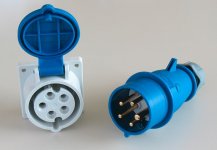
Well, it turns out the R5000 was a International High Power model designed to use Commando-style IEC60309 power connectors.

These:

CEE_3P+N+PE_230V.jpg

No one in the U.S. knows what to do with these power connectors. It probably scared potential buyers away.

I - of course - realized I could remove them, and install a 240v US L6-30 power connector. The International High Power unit was designed for 230v->neutral, but the UPS doesn't care if it is split circuit. It can only see the voltage between the two conductors, and 240v is 240v.... So it doesn't matter.

I wasn't sure the unit would be in working order after sitting for 9 years. I knew the batteries would be trash, as lead acid batteri4es need to be charged every 6 months or so or they degrade, so the original batteries were going to be complete garbage. They may have swollen or leaked. The capacitors may have seen thinning of the dielectric layer, and I didn't know if the unit was going to choke on 240v 60hz split phase instead of the 230v 50hz single phase it was intended for.

So it seemed like a risk. I made a $500 offer.

I didn't expect the seller to accept it. But they did. They just wanted the **** thing gone. It had been sitting in their warehouse since they bought it from an Amazon return pallet (presumably because someone accidentally bought the international version and returned it 9 years ago) and they probably figured they'd cut their losses and just stop the thing taking up space in their warehouse.

Now a different problem. I told them I'd pay cash, and come pick it up. They were in rural southern Delaware. I'm north of Boston. That's ~1,000 miles round trip. I guess it was time for a road trip.

So I made a spur of the moment road trip out of it. Made plans to see an old college friend who lives in Baltimore while I was down there. I figured at least if the UPS turned out to be a dud, the trip would not be completely in vain.

I drove down, caught up with my friend in Baltimore, crashed at a hotel in rural southern Delaware, and then picked up the unit at this weird warehouse right in the middle of farm fields:
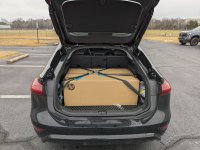
01.jpeg

Then I hit the road back.

I found the box had been opened, but it was apparently unused. Film on displays was still there, as were the stickers covering the power attachments for the batteries.

And importantly, the massive rack mount kit and network management card were still in the box.
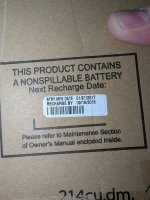
02.jpeg

Yeah, these batteries were not going to be good anymore. Luckily they had not swelled, and were thus not stuck in the unit.

So, I got the unit home, and discovered that while it was really easy to load it into the car with two people, getting it back out alone was not going to happen. It was simply too heavy.

With great difficulty I was able to rotate it in the trunk and then cut open the side of thee box aligned with the front of the unit, and then slid the three battery modules (6 batteries each) out one by one.
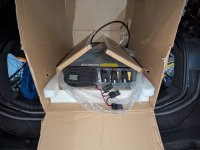
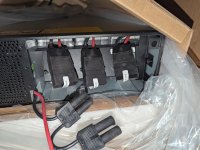
04.jpeg

05.jpeg

Unsurprisingly, Eaton/HPE used great Yuasa batteries from the factory.
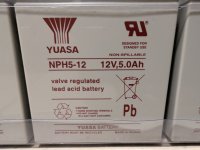
03.jpeg

while they are great, the better the lead acid battery, the heavier it is.

With all of the batteries out, I was finally able to lift the unit out and bring it inside. where I started the process of replacing the connectors:
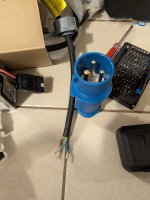
06.jpeg

In the U.S. our color codes for residential AC power are usually as follows:
Black - Line 1 (120v)
Red - Line 2 (120v, opposite phase)
White - Neutral
Green or bare copper - Ground

In Europe the colors codes are slightly different:
Brown - Line 1 (230v)
Blue - Neutral
Green/yellow - Ground.

So I wired the brown to Line 1, the blue to line 2, and the ground to gound. No neutral needed for this one, as th ecircuit is between the two live wires.

I could have wired them to a NEMA 14-30 dryer plug (just not using th eground wire) but I wanted to do it right, and the right plugs for these units are L6-30 plugs. These are round locking 240v connectors (insert, then twist to lock) designed for two live wires and a ground.

These UPS units have one male plug (for plugging them into the wall) and one female pigtail for connecting a large PDU for multi-rack installs. I won't be needing the large PDU, but I decided to replace the female connector on the pightail anyway for good measure.

There are many manufacturers for these replacement plugs, but Hubbell is widely regarded to be the best, so I went with them. HBL2621 for the male and HBL2623 for the female.

Then I also needed to replace the receptacle in the wall to match, and return the breaker to a 30 amp dipole breaker.

This provided to be a bigger challenge than I expected. NEMA 14-30 dryer plugs are pretty common. Most people have a dryer. They are large, bulky plugs and as such are typically installed centered in a two-gang electrical box. So, this is why there was a two gang box already in the wall (and why I could previously install two NEMA 5-20 receptacles in it, earlier in this thread.)

However, the round L6-30 recentacle is smaller, and is typically installed in a single gang box. I was thinking I could just reuse the blank cover from the NEMA 14-30, but no, the hole in it was WAY too big. I could find the smaller 1.62" hole faceplates locally, but only for single gang installations, but I wasnt about to just install it on one side, and ghetto mount a blank to the gaping hole on the other... (I'm not sure if this even meets code)

After much frustrating searching I finally found a faceplate from a company amusingly named "Kyle Switch Plates". I would have prefered it in stainless, but that one was sold out, so unwilling to delay things any further I just ordered the white one.

It turns out the previous stainless faceplate was not kind to the wall, gouging it a bit, and this faceplate was smaller than that one, and thus not covering the damage, but at least it worked:
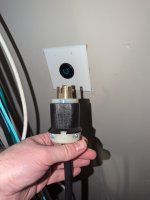
PXL_20260313_234716911.jpg

Now, I was concerned that the capacitors may have suffered from having thinned dielectric layers due to sitting unused for 9 years, so I decided to go gentle on it, plugging it in, and powering it on, but letting it sit without batteries or load for a few days.

This approach is called "reforming" as it can allow the capacitors to re-grow their dielectric layer.

If you just go full load right out of long term disuse, it is likely to let out the magic smoke.

So that's what I did.

Plugged it in, and it immediately saw 244v. It (rather politely, not obnoxiously loud at all) beeped at me, until I went into the menu and changed the power settings from 230v 50hz to 240v 60hz.
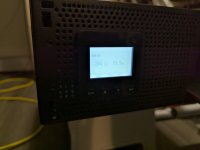
PXL_20260304_030327119.jpg

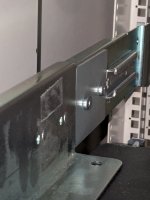
Then it was time to install the rail kit in the rack, which was a bloody nightmare.

HP/Eaton in their wisdom designed this rail kit to be installed by taking the side panels off the rack in order to screw in some of the brackets on the sides.

Mine CAN come off, but with great difficulty, and taking the right side off would entail removing the radiators again (which I was not about to do)

So, I did it from the inside, often with insufficient space, and blind. I dropped screws into irretrievable places and cursed a lot, but the one thing I do appreciate about HPE with this design is that they included plenty of spare screws, something most rail kits don't.

Then when I thought I had the **** thing fully installed, I discovered a problem. (And apparently I have to split the post here, due to a 10 image max per post limit)
 
PXL_20260307_043045241.jpg

You see, the brackets on the side of the UPS were designed to slide into the little holder in the back, to keep it secure.

But the screws that held the square metal reinforcement bracket in place were large enough to block those sliding parts into the mounting bracket.

I don't know how this happened, if HP never test fitted the system, or if someone changed the screws after the fact, but it was a major pain.

First I tried with replacement M6 flat head screws from Home Depot designed for counter-sinking. This provided a little bit more space, but not enough.

In the end, I flipped the bracket around the outside of the rail, and between the flat head screws and the bracket being moved tot he back, it just barely slid in.

Now while the capacitors were reforming it was time to order some small 240v PDU's, C13/C14/C19/C20 power cables and - of course - the batteries.

18 lead acid batteries, even the small ones these units use - are going to be expensive.

There are some budget brands, but my research on the topic cautioned me about using them, as they can drop voltage under high load.

Local budget batteries like Universal Battery or Maxx Battery, while good for emergency lighting and things like that, are not ideal for high end UPS use.

Initially I thought I was going to get Vision High Rate batteries. They sit somewhere between the bottom barrel batteries from Universal or Maxx and the Yuasa batteries the unit originally came with.

After much going back and forth, I decided to go with higher end batteries, and not risk overheating, swelling and random shutoffs you might get with lower end batteries.

Generally CSB batteries are considered to be the best there is. Yuasa are a close second. Yuasa wound up being more expensive than CSB's when I was shopping so I went for the CSB's.

18x CSB HR 1227WF2 shipped from OSIBatteries (they always seem to have the most reasonable shipping costs for these heavy battery orders) wound up totaling $499.74 shipped, which is really quite reasonable for the 27W CSB batteries.

The batteries are not here yet. When they arrive, I need to assemble them into the three battery modules that slide into the unit. For this I have bought a Knipex polymer insulated set of pliers that is rated up to 1000v, because DC voltage can be scary at higher voltages, and you can't exactly turn off the batteries during assembly.

Once the batteries are assembled into packs, and installed it will be time to do some light loads to reform the load side capacitors, and after that it will be go-live time.
 
Become a Patron!
Back
Top